Gildam turns a mounted iPhone into a dashcam that records while the app stays open on screen. Mark the moments you want to revisit, then find them again on a map alongside the video once you have arrived. Trim just the part you need and save it to Photos or share it.
Captured from the in-development app in the iOS Simulator. The app interface is currently Korean only; the route and marks are test data.
01 / How it works
Set it before you go. Review it when you arrive.
Gildam is designed to keep your hands off the phone while driving. You set it up before you leave, and you review and edit after the drive is over.
01
Mount it and start recording
Before you set off, mount your iPhone securely and start a drive. Gildam records through the rear camera for as long as the app stays on screen.
02
Mark what you want to remember
A mark is a bookmark pointing to that moment in the original video. We recommend marking only when stopped, or letting a passenger do it.
03
Revisit it in Drive History
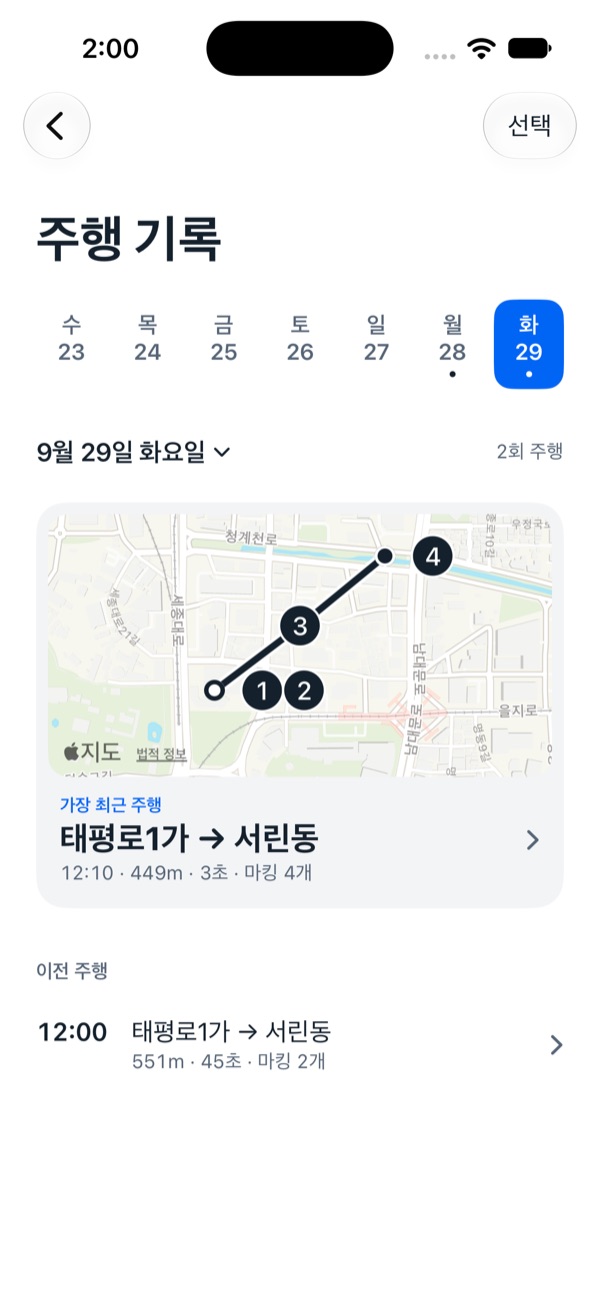
Drives recorded with location show the route and your marks on a map, with the video playing picture in picture. Tap a mark to jump straight to that moment.
04
Trim, save, and share
Select the range you need and save it to Photos or share it. The original recording stays untouched.
Screens in development
iOS Simulator captures. Korean interface; maps and drives are test data.
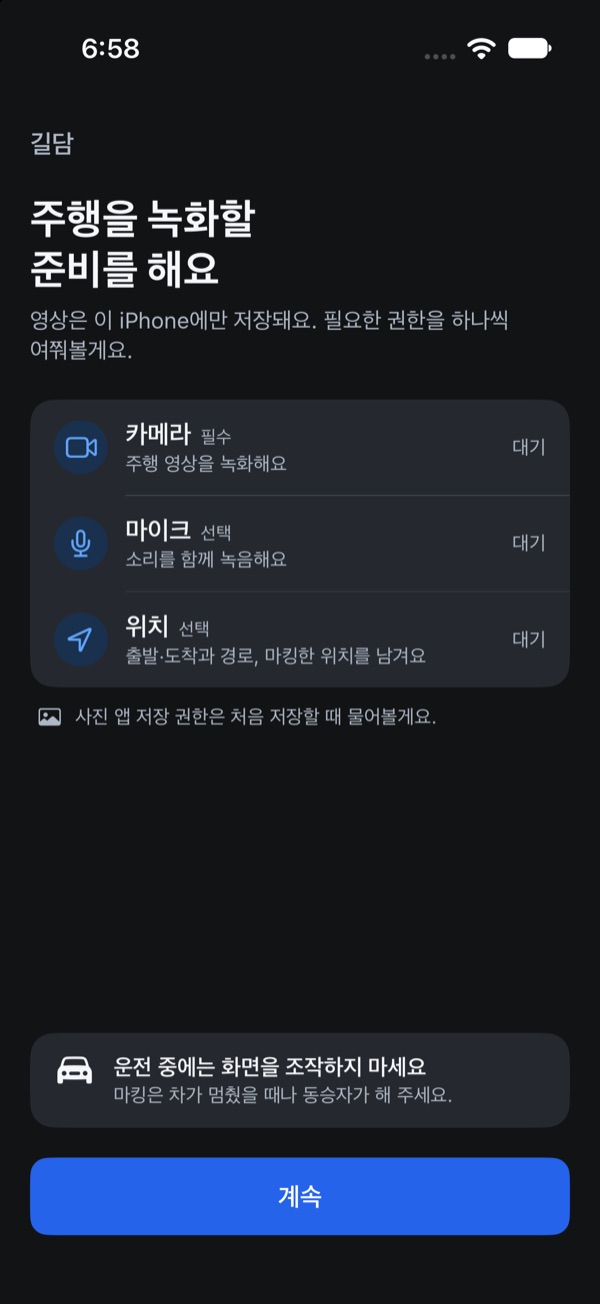
01Before you set offCamera, microphone, and location access, one at a time.
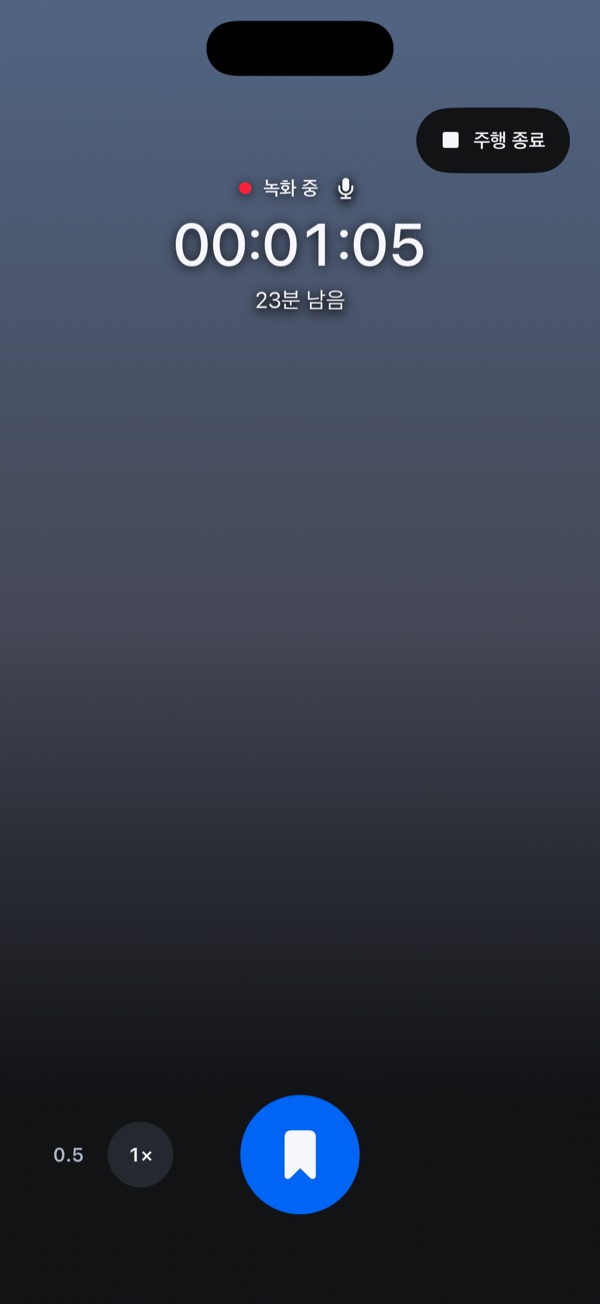
02Recording and markingSee the recording time left, and mark with one large button.
03A quiet clock screenRecording continues; double tap to mark.
04Drive HistoryRevisit drives by date, with their routes and marks.
02 / Features
From recording to sharing, in one app.
This is what is being built right now, described as it is. Details may change before release.
Drive History
Review with the map and video together
For drives recorded with location, a full map shows the route, start and end points, and your marks while the video plays in a small picture-in-picture window. Expand the video and the map floats as the picture-in-picture instead, so you can still see where you were.
Collapsible map PiP
Recorded speed
Location gaps shown as gaps
Range editing
Keep only the part you need
A range opens 30 seconds either side of the playhead; drag its handles to adjust. Saving to Photos keeps the original quality, with an optional date and time stamp. When sharing, choose original, 1080p, or 720p. Video is never upscaled.
Preview the selection
Optional timestamp
Originals preserved
Recording
4K or 1080p, at 60 or 30 fps
Choose resolution and frame rate within what your iPhone supports. The default is 4K at 60 fps, and you can zoom or switch lenses mid-recording. Portrait or landscape mounting is set in Settings.
Marks
Bookmarks, not copies
A mark does not cut or duplicate footage; it simply remembers a moment in the original. Even when the screen has dimmed, a double tap adds a mark without interrupting the recording.
Location
Routes drawn only from what was recorded
With location access, Gildam saves the route and where each mark was made. Stretches without a location fix are never guessed or filled in, and recording and marking carry on without location.
Display
A quiet clock while recording
After the delay you choose, the preview fades to a dark clock screen. A single tap brings it back, and recording carries on throughout.
Storage
Know how much time you have left
While recording, Gildam shows the recording time remaining, and stops recording if free space drops below 2 GB so existing footage is protected. Automatic cleanup of older drives is off by default.
Recovery
Recovering what can be read
If the app quits unexpectedly, it is designed to recover the readable part of the recording on next launch, along with any marks inside it.
What Gildam does not do
We would rather be clear up front about what is not supported.
Background recording when the app is not on screen
Automatic collision or accident detection
Parking mode recording
Automatic plate recognition, or legible plates at night
Cloud backup or account sync
Submitting footage directly to authorities
03 / Status
Still being built.
In development · No public download
Gildam is not yet on the App Store. It is currently in internal testing while recording, review, and range saving are refined. When a release date and format are decided, this page will be the first place to say so.
Aug 2026
JP LAB founded
The software studio behind Gildam opened for business.
Internal testing
Internal TestFlight builds
TestFlight builds have gone to an internal test group. This is not a public beta.
Now
Checking it on real roads
Long drives, heat, interruptions such as calls and notifications, and audio playback all need hands-on checks on a real device, separate from automated tests.
Next
Deciding how to release
There is no release date yet.
04 / Who makes it
JP LAB제이피랩
JP LAB is a small software studio making iOS apps. Planning, design, and development of Gildam are all done in house.
Protect the original footage. Show missing location as missing. Never promise performance that has not been verified. These are the standards Gildam is built to.
Business type
Sole proprietorship
Industry
Application software development and publishing
Founded
August 28, 2026
Product
Gildam (iOS, in development)
05 / FAQ
Good to know before you drive.
Does it keep recording if I close the app or switch to another one?
No. Gildam records only while the app is on screen. If you switch apps or a call interrupts recording, the footage up to that point is saved and closed, and you need to resume recording yourself.
What should I do before I start driving?
Before you set off, mount your iPhone securely where it does not block your view, check that the portrait or landscape orientation in Settings matches how it is mounted, and then start recording. The app does not follow device rotation, so a mismatch saves the video rotated.
Long recordings need plenty of free storage and power. Do not operate the app while driving; add marks only when stopped or with a passenger.
Will it automatically keep footage if there is an accident?
No. There is no collision detection or automatic incident saving. Recordings stay on your iPhone until you delete them, or until automatic cleanup removes them if you have turned that setting on.
Does Gildam guarantee recording or keep me safe?
No. Gildam is still in development, and depending on device condition, heat, storage, permissions, and mounting, recording may stop or miss the moment you wanted. It is not a substitute for a dedicated dashcam or any safety device, and safe driving remains the driver's responsibility.
Can I report an incident straight from the app?
Gildam cannot submit footage to authorities. Save or share the range you need, then attach it yourself following the instructions of the service you are using.
Will license plates be readable at night?
That cannot be guaranteed. Image quality depends heavily on the iPhone camera, lighting, distance, speed, and the condition of the windshield. Gildam does not read plates automatically either.
Can I use it without allowing location access?
Yes. Recording and marking work without location; those drives simply open straight in the video player, without a map. If you deny microphone access, video is recorded without sound.
Where is my footage stored?
On your iPhone. There is no account and no cloud upload; saving to Photos and sharing happen only when you choose to.
When can I download it?
There is no public download yet and no release date. Once there is, it will be announced on this page.